Demos · 나음 병원
Healthcare · Clinic Operations
나음 병원
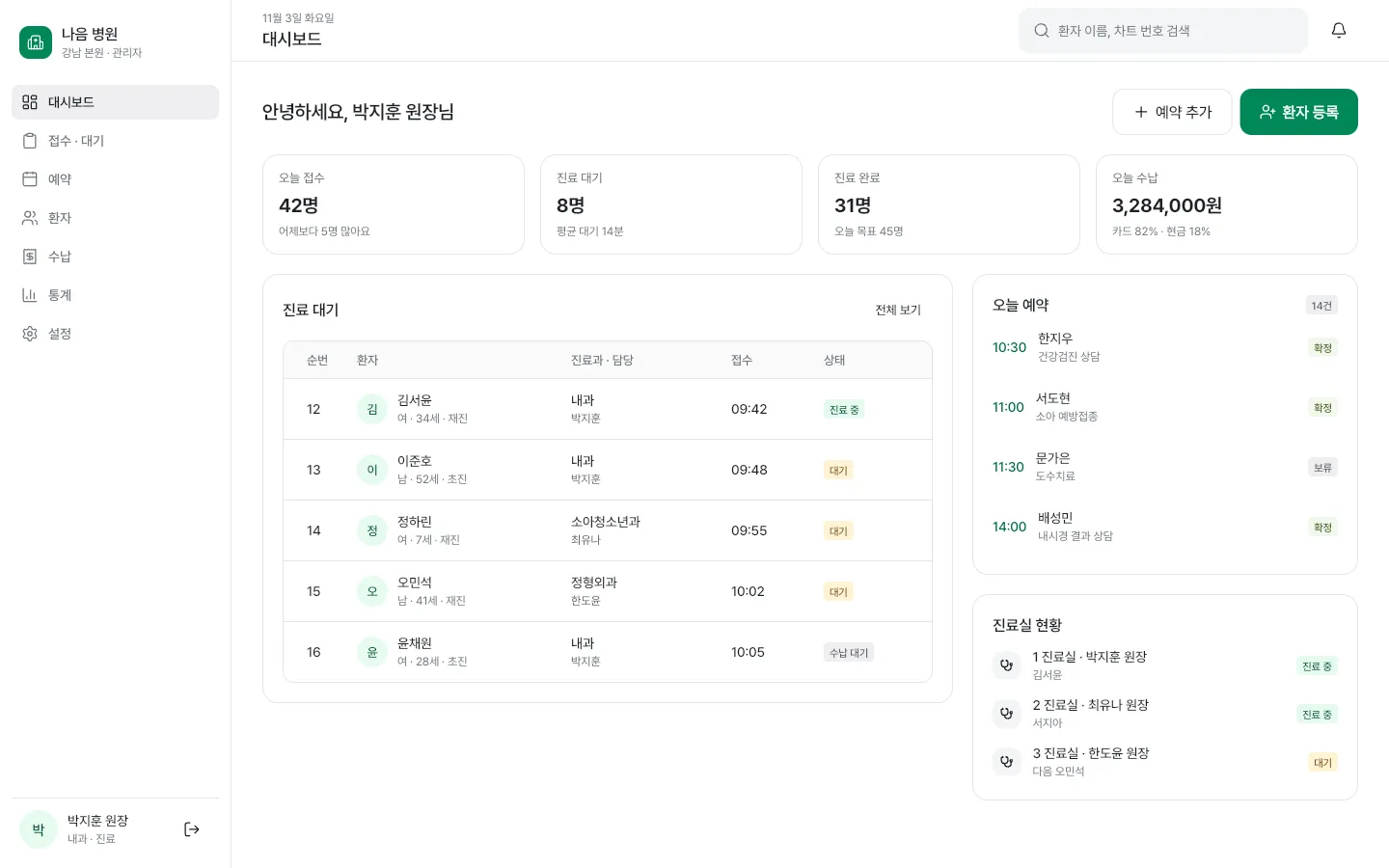
A clinic operations dashboard for staff
Screens you visit inside the preview are also added to this tab's back history. To explore for longer, open it in a new window.
At a glance
This is a sample work app for clinic staff, built by Cocode with Flutter, CoUI and Serverpod. Sign in as the doctor or the front desk to see today's check-ins, waiting, completed visits and payment totals, the waiting queue, today's appointments and the exam rooms on one screen, and call the next patient on a phone-sized screen. Cocode builds apps like this as outsourced projects, from planning and development to deployment and maintenance.
- Type
- A clinic operations dashboard for staff
- Parts
- Staff app · Widgetbook · Golden gallery · Project documentation
- Tech
- Flutter · CoUI · Serverpod · Widgetbook
- Try it
- In your browser, no sign-up, with sample data
- Built by
- Cocode Inc.
Key features
3 features
- Staff sign-inSign in with an ID and password, or go straight in with the doctor or front-desk demo account. On the sign-in screen you can switch the language and theme and reset the sample data.
- Today's dashboardSee today's check-ins, waiting, completed visits and payments, along with the waiting queue, today's appointments and the exam rooms, on one screen.
- Layouts for every widthA sidebar on desktop, an icon rail on tablets and bottom tabs on phones. On a phone you can see the next patient and call them in.
Demo accounts
On the first screen, pick the doctor or front-desk account under “Choose a demo account” to go in without a password. You can also type any password under the prefilled ID and press “Sign in”.
- DoctorDashboard · Waiting queue · Today's appointments · Exam rooms · Own totals on phones
- Front deskDashboard · Waiting queue · Today's appointments · Exam rooms · Clinic-wide totals on phones
Screens to explore
4 in total. Each one opens right in your browser, in a new window.
- AppStaff appSign in as staff and see today's dashboard (opens in a new window)
- WidgetbookWidgetbookScreen and component catalog (opens in a new window)
- GoldenGolden galleryScreen captures by device and theme, checked against the design (opens in a new window)
- DocsProject documentationStructure, conventions and design-check notes (opens in a new window)
Tech stack
About the demo environment
- A demo built around a fictional clinic. No actual check-ins, payments, patient calls or messages are made.
- It runs on sample data inside this browser, with no server. Do not enter real passwords or patient information.
- Changing the language switches the screen text and sample data such as patient and staff names and visit reasons to that language.
- For now only staff sign-in and the dashboard are open. Other menus only show a coming-soon note, and buttons such as Add appointment and Register patient have no features yet.
Custom clinic staff app development
From the first call to handover. We scope the work first, then give you a quote.
- ConsultationWe get in touch to understand your situation
- Scoping1 week. Screen list, then quote and contract
- Design & buildYou try an interim version every week
- HandoverRepository · Admin · Permissions · Documents
- Ops (optional)Store support and maintenance
FAQ
Can a clinic staff app be built as an outsourced project?
Yes. Cocode takes on staff apps like this one, covering check-ins, the waiting queue, appointments and exam-room status, from planning and development to deployment and maintenance. We start by learning how your clinic works today, then spend one week listing the screens before the quote and contract.
How is pricing determined?
It depends on what you want to build. We first define the scope with you and then give you a quote. How we set costs and how our contracts work are explained on the Process & pricing page.
How long does it take?
It depends on what you want to build. Tell us what you have in mind, and we will start by working out how long it would take. While the work is in progress, you can check a working interim version every week through a link and a test app.
Who owns the copyright and the deliverables?
Upon completion of acceptance and full payment, all economic rights in the copyright vest in your company — including the right to create derivative works — and we will not exercise moral rights in the deliverables. This is stated in the contract.
Shared components used across multiple projects, such as CoUI, are excluded from the transfer. Instead, you receive a copy of their source code together with the right to use and modify them without limits on term, quantity, or territory. Business logic, data structures, and brand elements unique to your company all belong to your company.
How is this demo different from a real clinic app?
This demo is built around a fictional clinic and runs on sample data in your browser, so it makes no actual check-ins, payments or patient calls. A real app is built with the same technology once we settle the screens your clinic needs and which existing systems it must connect to.
Need a system like this?
You can send us just three lines. That's where scoping starts.