Demos · Clinic EMR
Healthcare · EMR
Clinic EMR
Cloud EMR for dermatology and cosmetic surgery clinics
Screens you visit inside the preview are also added to this tab's back history. To explore for longer, open it in a new window.
Overview
An EMR that brings a clinic's whole day into one system, from appointments to check-in, charts, payment, insurance claims, CRM and statistics. Choose a role to enter, and you get the menus and permissions of that role: clinic director, consultation manager, coordinator, nurse, skin-care therapist or doctor. The admin console shows the operator's screens for managing multiple clinics.
Key features
6 features
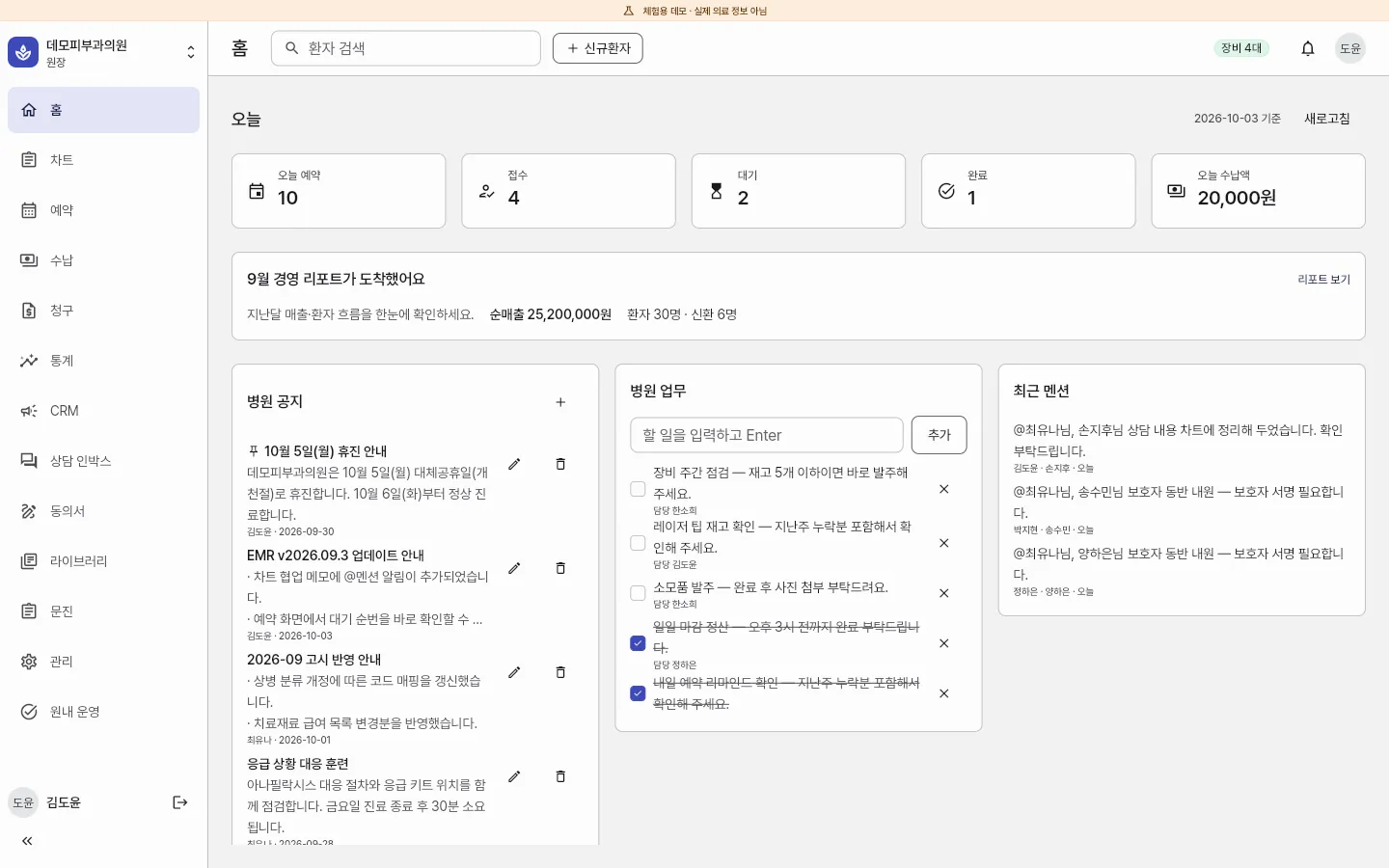
- Today at a glanceOne home screen brings together today's counts (appointments, check-ins, waiting, completed) and payments received, clinic notices and to-dos, and @mentions from colleagues.
- Appointments and check-inBook appointments on the timetable in the appointment planner, then check in arriving patients and move them to the waiting queue.
- Charts and prescriptionsTreatment, nursing and skin-care records and prescriptions are written on screens built for each role.
- Payment and claimsPayments, discounts and insurance claims are handled on screens built for each role.
- CRM and consultationsThe consultation inbox, CRM, consent form and questionnaire menus cover consultations and customer management.
- Statistics and admin consoleMonthly management reports, and an admin console showing clinics, subscriptions, message credits and the status of external integrations.
Demo accounts
On the app's first screen, pick an account under “Pick an account to enter” to sign in without a password.
- Clinic director김도윤All menus · statistics · administration
- Consultation manager박지현Consultations · payment discounts · CRM
- Coordinator최유나Appointments · check-in · payment · claims
- Nurse정하은Waiting queue · nursing records · vitals
- Skin-care therapist한소희Skin-care records · waiting queue
- Doctor이서준Treatment · charts · prescriptions
Screens to explore
5 in total. Each one opens right in your browser, in a new window.
- AppClinic appPick a role and try appointments, charts and payment (opens in a new window)
- ConsoleAdmin consoleClinics · subscriptions · credits · integration status (opens in a new window)
- WidgetbookWidgetbookUI components, state by state (opens in a new window)
- GoldenGolden galleryScreenshots by device and theme (opens in a new window)
- DocsAnalysis docs9 documents, from product overview to business rules (opens in a new window)
Tech stack
About the demo environment
- This is a demo for trying things out — data stays only in this browser and is not real medical information.
- Reloading the page returns it to its initial state.
- Do not enter real patient information.
- Sample data (names, records) is in Korean — the interface text appears in the language you chose.
Need a system like this?
You can send us just three lines. That's where scoping starts.